Java Web 从入门到退坑 —— 第七章 Servlet
By -gregPerlinLi-
1. Servlet 技术
1.1. 什么是 Servlet
1. Servlet 是 JavaEE 规范之一,规范就是接口
2. Servlet 是 JavaWeb 三大组件之一,分别是:Servlet 程序、Filter 过滤器、Listener 监听器
3. Servlet 是运行在服务器上的 Java 小程序,它可以接受客户端发送过来的请求,并响应数据给客户端。
1.2. 动手实现 Servlet 程序
1. 编写一个类去实现 Servlet 接口
2. 实现 service 方法,处理请求并响应数据
3. 到 web.xml 去配置 Servlet 程序的访问地址
<!-- Servlet tag is configuring Servlet program for Tomcat -->
    <servlet>
        <!-- servlet-name tag is give an alias to the servlet program (It's usually a class name) -->
        <servlet-name>HelloServlet</servlet-name>
        <!-- servlet-class is full class name of the Servlet program -->
        <servlet-class>com.gregperlinli.Servlet.HelloServlet</servlet-class>
    </servlet>

    <!-- servlet-mapping tag is configure access address for servlet program -->
    <servlet-mapping>
        <!-- servlet-name tag is to tell the server the current server address to which servlet program to use-->
        <servlet-name>HelloServlet</servlet-name>
        <!-- url-pattern tag is configure access address
                /             When the slash is parsed by the server, it means that the address is: http://ip:port/projectPath
                /hello        The address is: http://ip:port/projectPath/hello
        -->
        <url-pattern>/hello</url-pattern>
    </servlet-mapping>
常见错误:
1. url-pattern 中配置的路径没有以斜杠 / 打头
Invaid <url-pattern> hello in servlet mapping
2. servlet-name 配置的值不存在
Servlet mapping specifies an unknown servlet name HelloServlet1
3. servlet-class 标签的全类名配置错误
java.lang.ClassNotFoundException: ...
1.3. URL 地址到 Servlet 程序的访问

1.4. Servlet 程序的生命周期
1. 执行 Servlet 的构造器方法
2. 执行 init 初始化方法
3. 执行 service 方法
4. 执行 destory 销毁方法
注意⚠️:第一、二步,是在第一次访问创建 Servlet 程序会调用,第三步每次访问都会调用,第四部在 Web 工程停止的时候调用
1.5. GET 和 POST 请求的分发处理
示例代码:
public class HelloServlet implements Servlet {
      /**
     * Service method is dedicated to handling requests and responses
     *
     * @param servletRequest
     * @param servletResponse
     * @throws ServletException e
     * @throws IOException e
     */
        @Override
    public void service(ServletRequest servletRequest, ServletResponse servletResponse) throws ServletException, IOException {
        System.out.println("Hello Servlet is visited");
        // Type transformation
        HttpServletRequest httpServletRequest = (HttpServletRequest) servletRequest;
        // Access request mode
        String method = httpServletRequest.getMethod();
        System.out.println(method);

        if ( "GET".equals(method) ) {
            doGet();
        }
        if ( "POST".equals(method) ) {
            doPost();
        }
    }

    /**
     * get request operate
     */
    public void doGet() {
        System.out.println("GET request");
    }

    /**
     * post request operate
     */
    public void doPost() {
        System.out.println("POST request");
    }
}
1.6. 通过继承 HttpServlet 实现 Servlet 程序
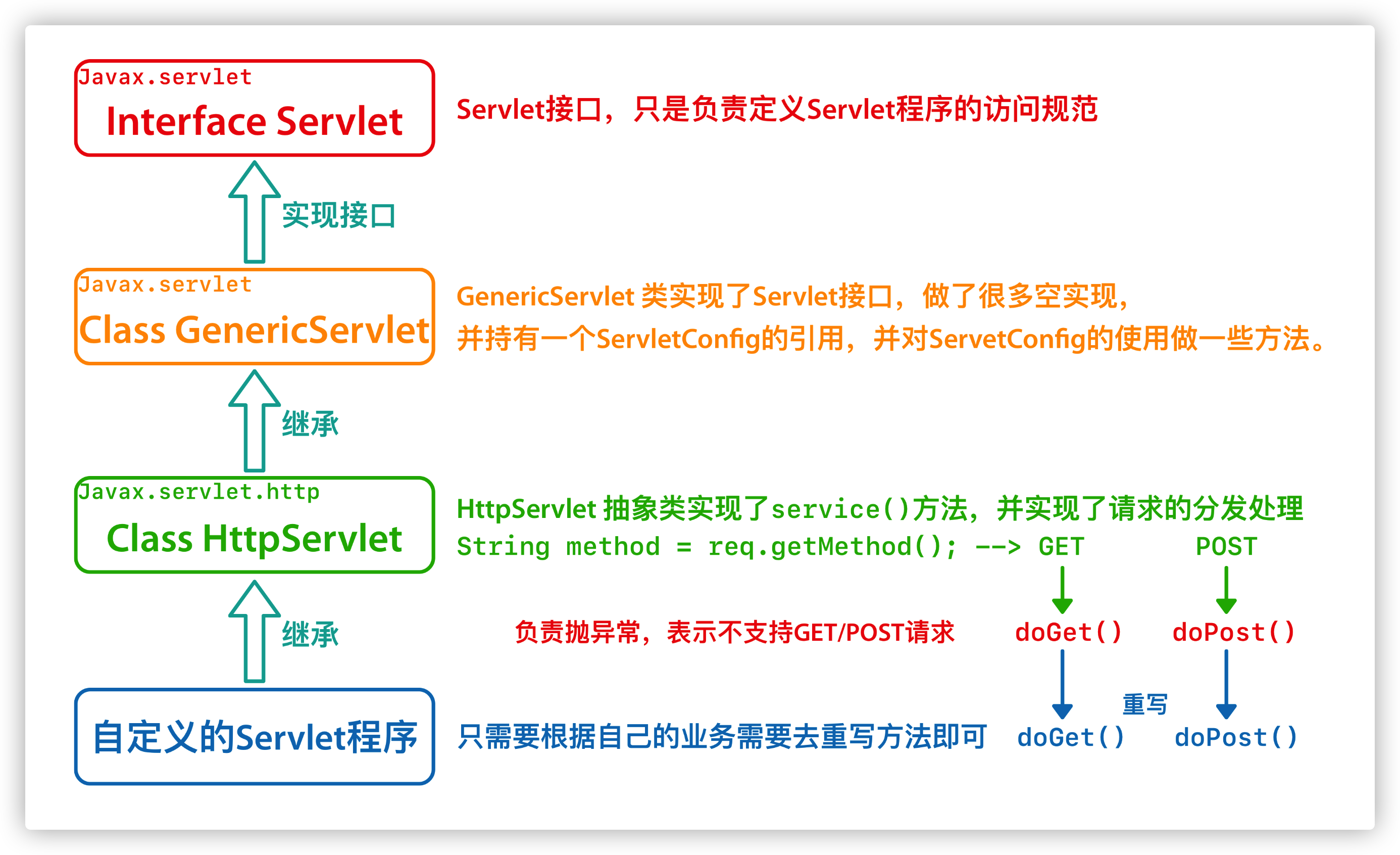
一般在实际项目开发中,都是使用继承 HttpServlet 类的方式去实现 Servlet 程序
1. 编写一个类去继承 HttpServlet 类
2. 根据业务需要重写 doGet 或 doPost 方法
3. 到 web.xml 中配置 Servlet 程序的访问地址
示例代码:
Servlet 类的代码
/**
 * @author gregperlinli
 */
public class HelloHttpServlet extends HttpServlet {
    /**
     * doGet() wil be called on GET request
     *
     * @param req
     * @param resp
     * @throws ServletException e
     * @throws IOException e
     */
    @Override
    protected void doGet(HttpServletRequest req, HttpServletResponse resp) throws ServletException, IOException {
        System.out.println("Hello HttpServlet by doGet()");
    }
    /**
     * doPost() wil be called on POST request
     *
     * @param req
     * @param resp
     * @throws ServletException e
     * @throws IOException e
     */
    @Override
    protected void doPost(HttpServletRequest req, HttpServletResponse resp) throws ServletException, IOException {
        System.out.println("Hello HttpServlet by doPost()");
    }
}
web.xml 的代码
<?xml version="1.0" encoding="UTF-8"?>
<web-app xmlns="http://xmlns.jcp.org/xml/ns/javaee"
         xmlns:xsi="http://www.w3.org/2001/XMLSchema-instance"
         xsi:schemaLocation="http://xmlns.jcp.org/xml/ns/javaee http://xmlns.jcp.org/xml/ns/javaee/web-app_4_0.xsd"
         version="4.0">
        <servlet>
        <servlet-name>HelloHttpServlet</servlet-name>
        <servlet-class>com.gregperlinli.Servlet.HelloHttpServlet</servlet-class>
    </servlet>
    <servlet-mapping>
        <servlet-name>HelloHttpServlet</servlet-name>
        <url-pattern>/hello2</url-pattern>
    </servlet-mapping>
</web-app>
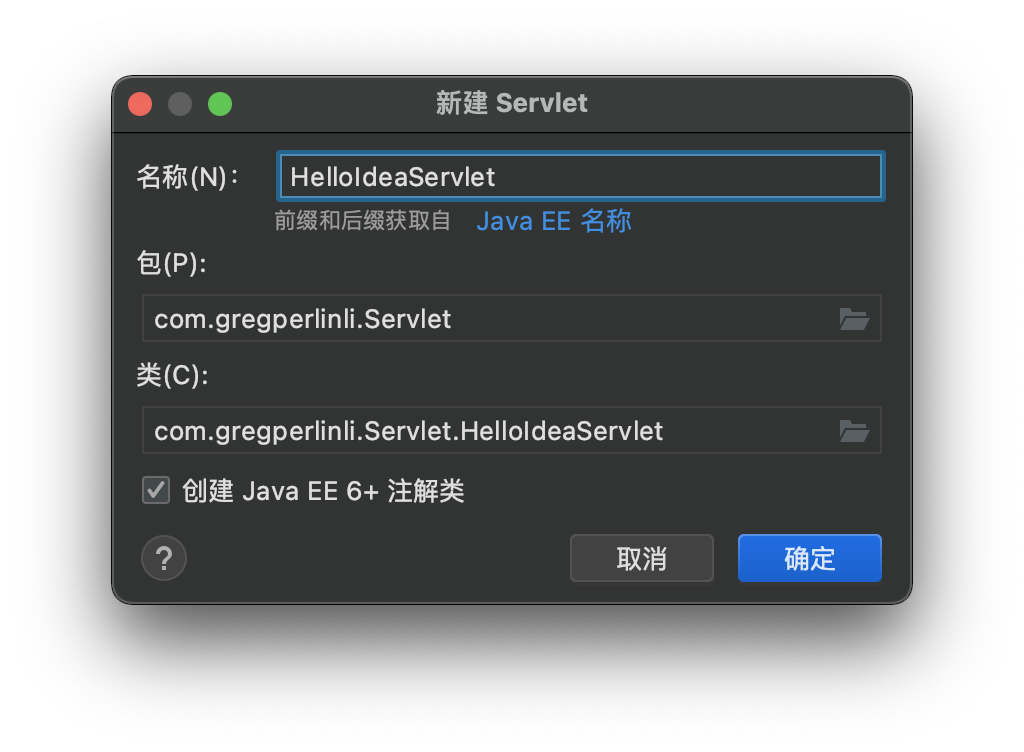
1.7. 使用 IDEA 创建 Servlet 程序
1. 选择 src 下的包名,右键,然后点击 New > Create New Servlet
2. 配置 Servlet 项(不要勾选创建 Java EE 6+ 注解类)
1.8. Servlet 类的继承体系
2. ServletConfig 类
ServletConfig 类从类名上看,就知道是 Servlet 程序的配置信息类
Servlet 程序和 ServletConfig 对象都是由 Tomcat 服务器负责创建,我们负责使用
Servlet 程序默认是第一次访问的时候创建,ServletConfig 是每个 Servlet 程序创建时,就创建一个对应的 ServletConfig 对象。
2.1. ServletConfig 类的三大作用
1. 可以获取 Servlet 程序的别名 servlet-name 的值
2. 获取初始化参数 init-parm
3. 获取 ServletContext 对象
示例代码:
Servlet 类的代码
/**
 * @author gregperlinli
 */
public class HelloServlet implements Servlet {
    @Override
    public void init(ServletConfig servletConfig) throws ServletException {
        System.out.println("init initialization method");
        // 1. You can get the value of the alias servlet-name of the servlet program
        System.out.println("The alias of HelloServlet is: " + servletConfig.getServletName());
        // 2. Get initialization parameters init-parm
        System.out.println("The value of initialization parameter username is: " + servletConfig.getInitParameter("username"));
        System.out.println("The value of initialization parameter url is: " + servletConfig.getInitParameter("url"));
        // 3. Get the ServletContext object
        System.out.println("The ServletContext object is: " + servletConfig.getServletContext());
    }
}
web.xml 中的配置:
<?xml version="1.0" encoding="UTF-8"?>
<web-app xmlns="http://xmlns.jcp.org/xml/ns/javaee"
         xmlns:xsi="http://www.w3.org/2001/XMLSchema-instance"
         xsi:schemaLocation="http://xmlns.jcp.org/xml/ns/javaee http://xmlns.jcp.org/xml/ns/javaee/web-app_4_0.xsd"
         version="4.0">
    <!-- Servlet tag is configuring Servlet program for Tomcat -->
    <servlet>
        <!-- servlet-name tag is give an alias to the servlet program (It's usually a class name) -->
        <servlet-name>HelloServlet</servlet-name>
        <!-- servlet-class is full class name of the Servlet program -->
        <servlet-class>com.gregperlinli.Servlet.HelloServlet</servlet-class>
        <!-- init-param is the initialization parameters of the servlet program -->
        <init-param>
            <!-- Parameter name -->
            <param-name>username</param-name>
            <!-- Parameter value -->
            <param-value>root</param-value>
        </init-param>
        <init-param>
            <param-name>url</param-name>
            <param-value>jdbc:mysql://localhost:3306/test</param-value>
        </init-param>
    </servlet>
</web-app>
注意⚠️:
重写 init 方法时一定要调用父类
@Override
public void init(ServletConfig config) throws ServletException {
    // If you want to override the init method, please enter the following sentence!
    super.init(config);
    System.out.println("Override the init initialization method and do some updated");
}
3. ServletContext 类
3.1. 什么是 ServletContext ?
1. ServletContext 是一个接口,它表示 Servlet 上下文对象
2. 一个 Web 工程只有一个 ServletContext 对象实例
3. ServletContext 对象是一个域对象
4. ServletContext 是在 Web 工程创建的时候创建,在 Web 工程结束的时候销毁
什么是域对象:
域对象是可以像 Map 一样存储数据的对象,这里的域指的是存储数据的操作范围。
| 存数据 | 取数据 | 删除数据 | |
|---|---|---|---|
| Map | put() |
get() |
remove() |
| 域对象 | setAttribute() |
getAttribute() |
removeAttribute() |
3.2. ServletContext 类的四个作用
1. 获取 web.xml 中配置的上下文参数 context-parm
2. 获取当前的工程路径,格式:/projectPath
3. 获取工程部署后在服务器磁盘上的绝对路径
4. 像 Map 一样存取数据
示例代码:
Servlet 类的代码
public class ContextServlet extends HttpServlet {
    @Override
    protected void doGet(HttpServletRequest request, HttpServletResponse response) throws ServletException, IOException {
        // 1. Obtain web.xml context parameters configured in context-parm
        ServletContext context = getServletConfig().getServletContext();
        String username = context.getInitParameter("username");
        String password = context.getInitParameter("password");
        System.out.println("The context-parm parameter username is: " + username);
        System.out.println("The context-parm parameter password is: " + password);
        // 2. Get the current project path in the format of /projectPath
        System.out.println("The current project path is: " + context.getContextPath());
        // 3. Get the absolute path of the project on the server disk after deployment
        /**
         * / The slash is parsed by the server as: http://ip:port/projectName/      Web directory mapped to IDEA code
         */
        System.out.println("The absolute path of the project on the server disk is: " + context.getRealPath("/"));
        System.out.println("The absolute path of css directory under the project is: " + context.getRealPath("/css"));
        System.out.println("The absolute path of 1.jpg in img directory under the project is: " + context.getRealPath("/img/1.jpg"));
      ServletContext context = getServletContext();
        // 4. Access data like a Map
        context.setAttribute("key1", "value1");
        System.out.println("The value of domain data key1 in context is: " + context.getAttribute("key1"));
    }
web.xml 中的配置
<?xml version="1.0" encoding="UTF-8"?>
<web-app xmlns="http://xmlns.jcp.org/xml/ns/javaee"
         xmlns:xsi="http://www.w3.org/2001/XMLSchema-instance"
         xsi:schemaLocation="http://xmlns.jcp.org/xml/ns/javaee http://xmlns.jcp.org/xml/ns/javaee/web-app_4_0.xsd"
         version="4.0">

    <!-- context-parm is context parameters (It belongs to the whole web project) -->
    <context-param>
        <param-name>username</param-name>
        <param-value>context</param-value>
    </context-param>
    <context-param>
        <param-name>password</param-name>
        <param-value>root</param-value>
    </context-param>
      <servlet>
        <servlet-name>ContextServlet</servlet-name>
        <servlet-class>com.gregperlinli.Servlet.ContextServlet</servlet-class>
    </servlet>
      <servlet-mapping>
        <servlet-name>ContextServlet</servlet-name>
        <url-pattern>/contextServlet</url-pattern>
    </servlet-mapping>
</web-app>
4. HTTP 协议
4.1. 什么是 HTTP 协议
什么是协议: 协议是指双方或多方相互约定好需要遵守的相关规定的规则。
什么是 HTTP 协议: 就是指客户端与服务器之间通信时,发送的数据需要准遵守的规则。
HTTP 协议中的数据又叫报文。
4.2. 请求的 HTTP 协议格式
客户端给服务器发送数据叫请求,服务器给客户回传数据叫响应。
请求又分为 GET 请求和 POST 请求
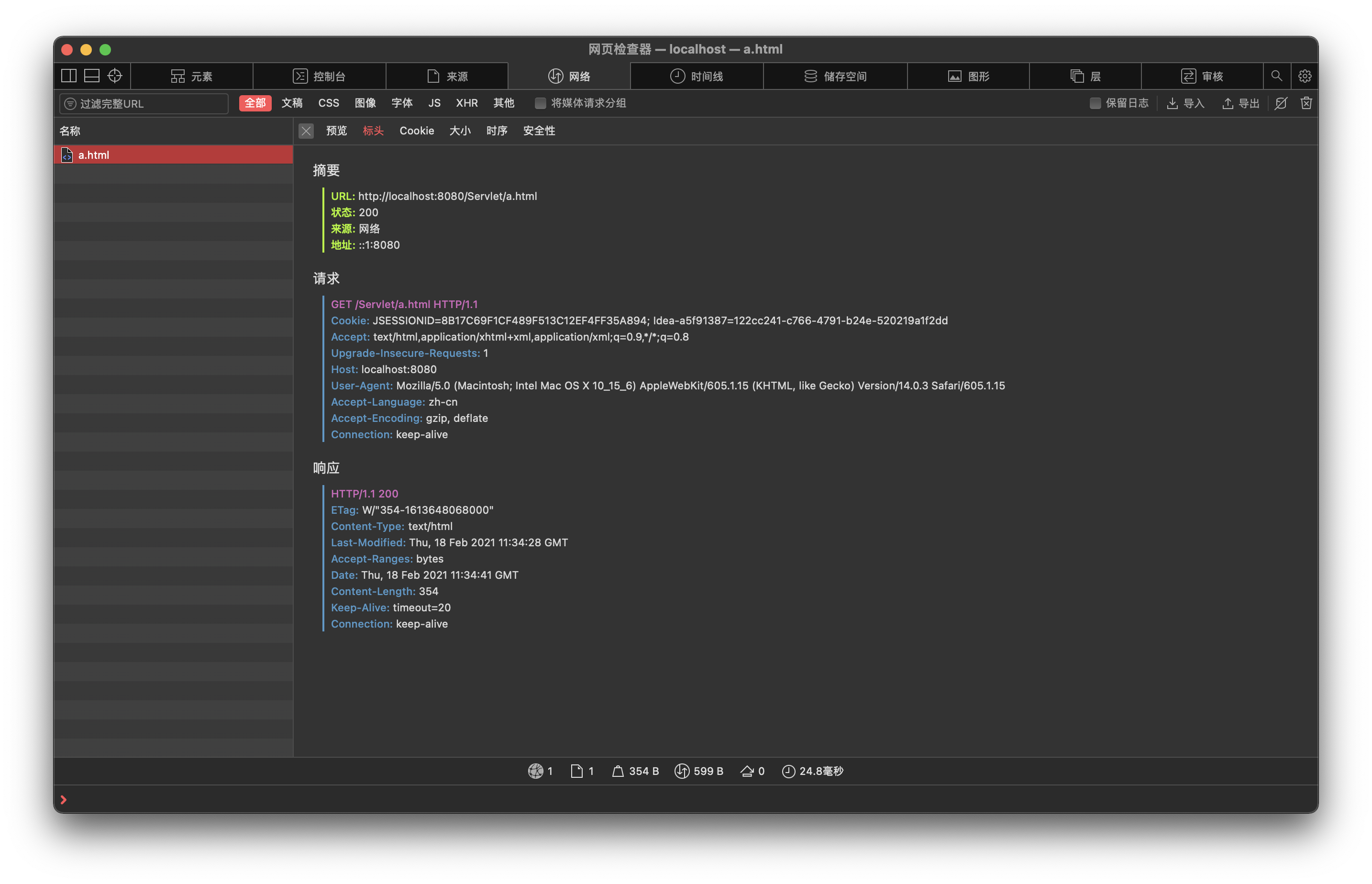
1. GET 请求
请求行
(1)请求的方式 GET
(2)请求的资源路径[+?+请求参数]
(3)请求的协议版本号 HTML/1.1
请求头
key:value 组成 不同的键值对表示不同的含义。
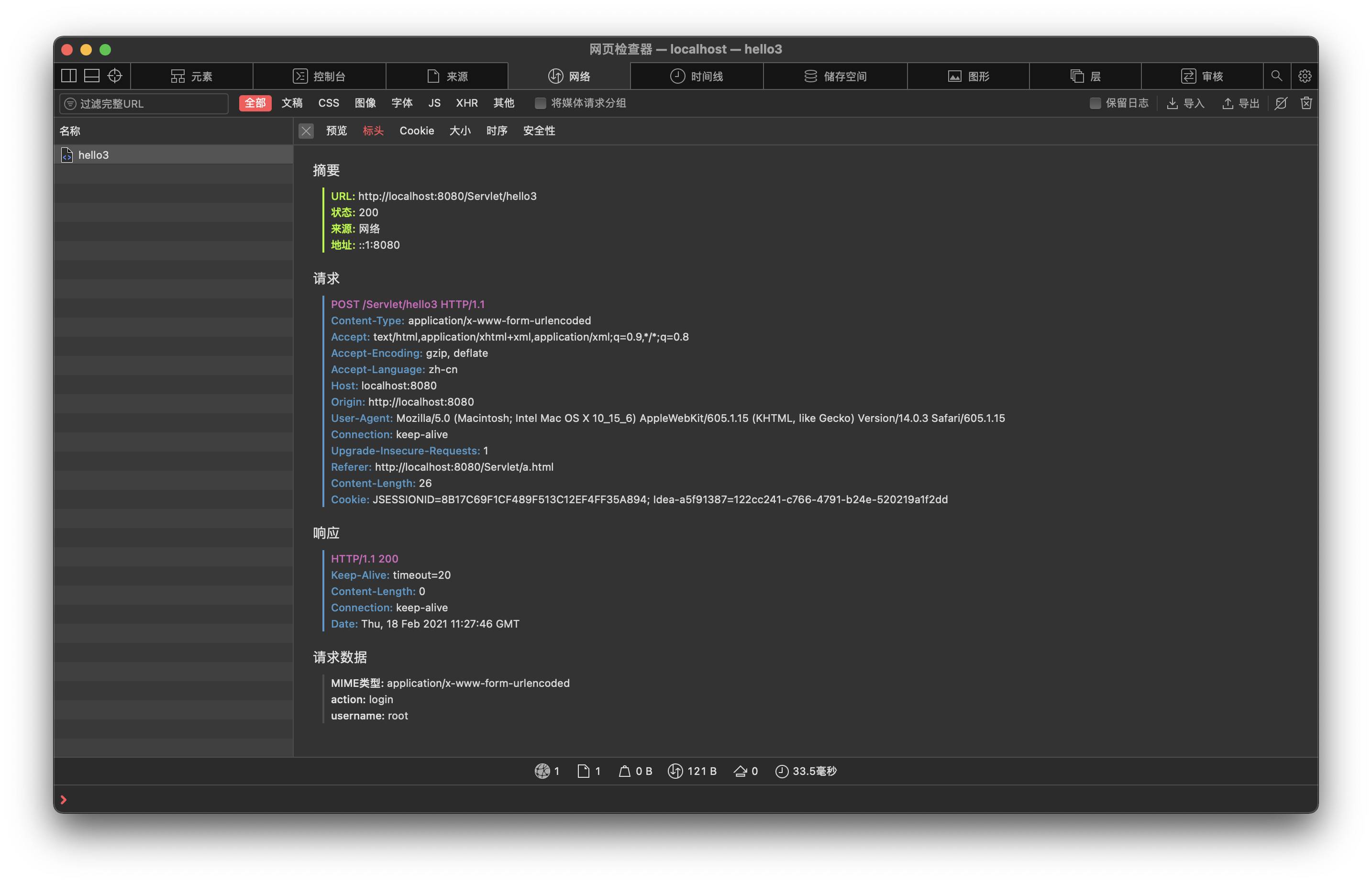
2. POST 请求
请求行
(1)请求的方式 POST
(2)请求的资源路径[+?+请求参数]
(3)请求的协议版本号 HTML/1.1
请求头
key:value 组成 不同的键值表示识不同的含义。
空行
请求体
就是发送给服务器的数据
3. 常用请求头的说明
Accept:表示客户端可以接收的数据类型
Accept-Language:表示客户端可以接受的语言类型
User-Agnet:表示客户端浏览器的信息
Host:表示请求时服务器的 `IP 和端口号
4. 哪些是 GET 请求,哪些是 POST 请求
GET 请求有哪些:
1. from 标签 method=get
2. a 标签
3. link 标签引用 CSS
4. script 标签引用 JavaScript
5. img 标签引入图片
6. iframe 引入 HTML 页面
7. 在浏览器地址栏中输入地址后回车
POST 请求有哪些:
1. from 标签 method=post
4.3. 响应的 HTTP 格式请求
1. 响应行
(1)响应的协议和版本号 HTTP/1.1
(2)响应状态码 200
(3)响应状态描述符(不一定有) OK
2. 响应头
(1) key:value 不同的响应头,有其不同的含义
3. 空行
响应体
回传给客户端的数据
4.4. 常见的响应码说明
200 表示请求成功
302 表示请求重定向
404 表示请求服务器已经收到了,但是你要的数据不存在(请求地址错误)
500 表示服务器已经收到请求,但是服务器代码错误(内部错误)
502 请求未完成。服务器充当网关或者代理的角色时,从上游服务器收到一个无效的响应。
4.5. MIME 类型说明
MIME 是 HTTP 协议中的数据类型
MIME 英文全称是 Multipurpose Internet Mall Extensions 多功能 Internet 邮件扩充服务。MIME 类型的格式是“大类型/小类型”,并与某一文件的扩展名相对应
常见的 MIME 类型
| 文件 | MIME 类型 |
|---|---|
| 超文本标记语言文本 | .html, .html text/html |
| 普通文本 | .txt txt/plain |
| RTF 文本 | .rtf application/rtf |
| GIF 图形 | .gif image/gif |
| JPEG 图形 | .jpeg, .jpg image/jpeg |
| AU 声音文件 | .au audio/basic |
| MIDI 音乐文件 | .mid, .midi audio/midi, audio/x-midi |
| RealAudio 音乐文件 | .ra, .ram audio/x-pn-realaudio |
| MPEG 文件 | .mpg, .mpeg video/mpeg |
| AVI 文件 | .avi video/x-msvideo |
| GZIP 文件 | .gz application/x-gzip |
| TAR 文件 | .tar application/x-tar |
5. HttpServletRequest 类
5.1. HttpServletRequest 类的作用
每次只要有请求进入 Tomcat 服务器,Tomcat 服务器就会把请求过来的 HTTP 协议信息解析好并封装到 Request 对象中,然后传到 service 方法(doGet 和 doPost)中使用。我们可以通过 HttpServletRequest 对象,获取到所有请求的信息。
5.2. HttpServletRequest 类的常用方法
getRequestURI() 获取请求的资源路径
getRequestURL() 获取请求的统一资源定位符(绝对路径)
getRemoteHost() 获取客户端的 IP 地址
getHeader() 获取请求头
getParameter() 获取请求的参数
getParameterValues() 获取请求的参数(多个值的时候使用)
getMethod() 获取请求的方式 GET 或 POST
setAttribute(key, value) 设置域数据
getAttribute(key) 获取域数据
getRequestDispatcher() 获取请求转发对象
示例代码
/**
 * @author gregperlinli
 */
public class RequestAPIServlet extends HttpServlet {
    @Override
    protected void doGet(HttpServletRequest req, HttpServletResponse resp) throws ServletException, IOException {
        // 1. getRequestURI()
        System.out.println("URI ==>> " + req.getRequestURI());
        // 2. getRequestURL()
        System.out.println("URL ==>> " + req.getRequestURL());
        // 3. getRemoteHost()
        System.out.println("Remote host ==>> " + req.getRemoteHost());
        /**
         * When using localhost to access in idea, the IP address is ===> 127.0.0.1
         * When using 127.0.0.1 to access in idea, the IP address is ===> 127.0.0.1
         * When using the real IP address to access in idea, the IP address is ===> Real IP address
         */
        // 4. getHeader()
        System.out.println("Header User-Agent ==>> " + req.getHeader("User-Agent"));
        // 7. getMethod()
        System.out.println("Method ==>> " + req.getMethod());
    }
}
5.3. 如何获取请求参数
示例代码
/**
 * @author gregperlinli
 */
public class ParameterServlet extends HttpServlet {
    @Override
    protected void doGet(HttpServletRequest req, HttpServletResponse resp) throws ServletException, IOException {
        System.out.println("-------------------- Do get --------------------");
        // Gets the parameters of the request
        String username = req.getParameter("username");
        String password = req.getParameter("password");
        String[] hobbies = req.getParameterValues("hobby");

        System.out.println("Username: " + username);
        System.out.println("Password: " + password);
        System.out.print("Hobby: ");
        if ( hobbies != null ) {
            for ( String hobby : hobbies ) {
                System.out.print(hobby + ", ");
            }
        }
        System.out.println();
    }
  @Override
    protected void doPost(HttpServletRequest req, HttpServletResponse resp) throws ServletException, IOException {
        // Set the character set of the request to UTF-8, so as to solve the problem of text garbled in the post request
        // The call is valid until the request parameter is obtained
        req.setCharacterEncoding("UTF-8");
        System.out.println("-------------------- Do post --------------------");
        // Gets the parameters of the request
        String username = req.getParameter("username");
        String password = req.getParameter("password");
        String[] hobbies = req.getParameterValues("hobby");
        System.out.println("Username: " + username);
        System.out.println("Password: " + password);
        System.out.print("Hobby: ");
        if ( hobbies != null ) {
            for ( String hobby : hobbies ) {
                System.out.print(hobby + ", ");
            }
        }
        System.out.println();
    }
}
注意⚠️: 在用 POST 方法提交的时候,一定要在调用请求参数之前先使用 req.setCharacterEncoding("UTF-8"); 来设置请求体字符集为 UTF-8 格式,否则会出现 POST 请求的中文乱码问题
5.4. 请求转发
什么是请求的转发:
请求转发是指服务器收到请求后从一个资源跳转到另一个服务器资源的操作。
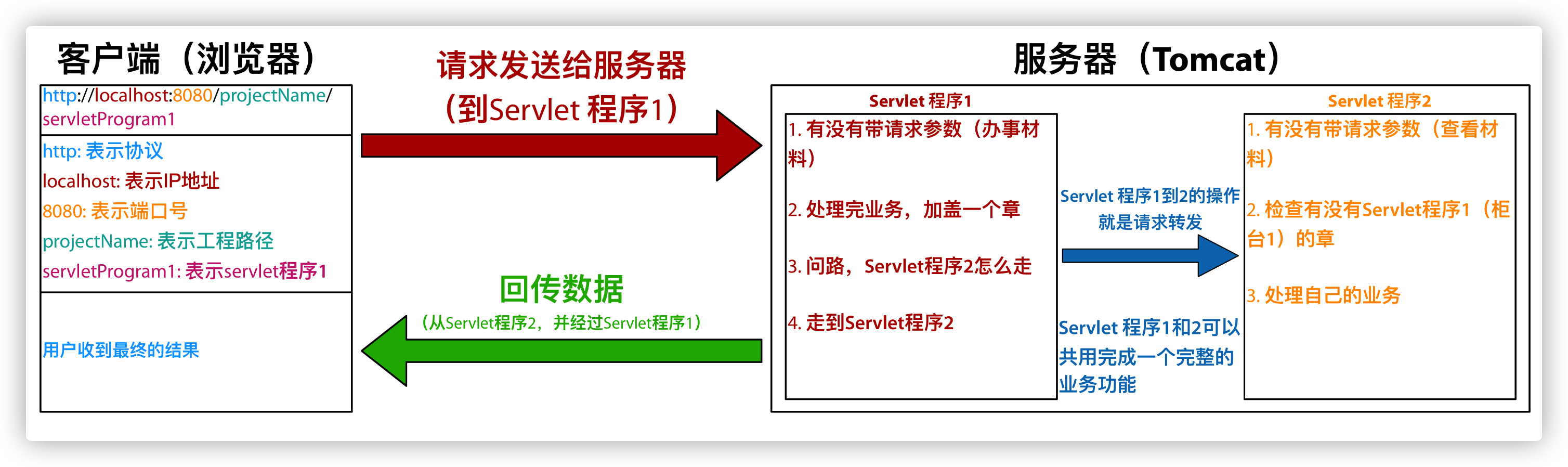
请求转发的特点
1. 浏览器地址栏没有变化
2. 它们是一次请求
3. 它们共享 Request 域中的数据
4. 可以转发到 WEB-INF 目录下(在客户端无法访问)
5. 只能在工程以内转发
示例代码
Servlet1.java
/**
 * @author gregperlinli
 */
public class Servlet1 extends HttpServlet {
    @Override
    protected void doGet(HttpServletRequest req, HttpServletResponse resp) throws ServletException, IOException {
        // Gets the parameters of the request (Materials for handling affairs) to check
        String username = req.getParameter("username");
        System.out.println("Check the parameter username in Servlet1 (counter 1): " + username);
        // Seal the material and pass it to Servlet2 (counter2) to check
        req.setAttribute("key", "Seal1");
        // Ask for directions: Servlet2 (counter2)
        /**
         * Request forwarding must start with a slash.
         * The address indicated by the slash is: http://ip:port/ProjectName/,
         * mapped to the web directory of idea code
         */
        RequestDispatcher requestDispatcher = req.getRequestDispatcher("/servlet2");
        // Towards Servlet2 (counter2)
        requestDispatcher.forward(req, resp);
    }
}
Servlet2.java
/**
 * @author gregperlinli
 */
public class Servlet2 extends HttpServlet {
    @Override
    protected void doGet(HttpServletRequest req, HttpServletResponse resp) throws ServletException, IOException {
        // Gets the parameters of the request (Materials for handling affairs) to check
        String username = req.getParameter("username");
        System.out.println("Check the parameter username in Servlet2 (counter 2): " + username);
        // Check whether servlet1 (counter1) has a seal
        Object key = req.getAttribute("key");
        System.out.println("Does Servlet1 (counter1) have a seal: " + key);
        // Handle the own business
        System.out.println("Servlet 2 is handling the own business");

    }
}
5.5. base 标签的作用
所有相对路径在工作时候都会参照当前浏览器地址栏中的地址来进行查询;而当使用请求转发的时候,浏览器的地址是不变的,所以参照的地址也会发生变化,这就需要靠 base 标签来保证和原来的地址一致
base 标签可以设置当前页面中所有相对路径工作时,参照哪个路径来进行跳转
base 标签中最后的资源名是可以省略的,但是斜杠 / 不能省略
示例代码
<!DOCTYPE html>
<html lang="en">
<head>
<meta charset="UTF-8">
<title>C</title>
<!-- base tag sets the address to be referenced when the page works relative to the path
href attribute is the address value of the parameter
-->
<base href="http://localhost:8080/ServletRequest/a/b/"/>
<style type="text/css">
body {
font-family: Futura, "PingFang SC", Helvetica, Arial, sans-serif;
}
</style>
</head>
<body>
<h1>
This is the C.html page under a and b
</h1>
<br/>
<a href="../../index.jsp">Back to index</a>
</body>
</html>
5.6. Web 中的相对路径和绝对路径
在 JavaWeb 中,路径分为相对路径和绝对路径两种
相对路径:
. 表示当前目录
.. 表示上一级目录
资源名 表示当前目录下的资源名
绝对路径:
http://ip:port/projectName/resourceName
5.7. Web 中 /斜杠的不同意义
在 Web 中, / 斜杠是一种绝对路径
/ 斜杠如果被浏览器解析,得到的地址是: http://ip:port/
/ 斜杠如果被服务器解析,得到的地址是:http://ip:port/projectName
1. <url-pattern>/servlet1</url-pattern>
2. servletContext.getRealPath("/");
3. request.getRequestDispatcher("/")
特殊情况:
response.sendRedirect("/"); 把斜杠发送给浏览器解析,得到 http://ip:port/(请求重定向)
6. HttpServletResponse 类
6.1. HttpServletResponse 类的作用
HttpServletResponse 类和 HttpServletRequest 类一样,每次请求进来,Tomcat 服务器都会创建一个 Response 对象传递给 Servlet 程序去使用,HttpServletRequest 表示请求过来的信息,HttpServletResponse 表示所有响应的信息。
如果需要设置返回给客户端的信息,都可以通过 HttpServletResponse 对象来进行设置。
6.2. 两个输出流的说明
字节流 getOutputStream(); 常用于下载(传递二进制代码)
字符流 getWriter(); 常用于回传字符串(常用)
注意⚠️: 两个流同时只能使用一个,即使用了字节流,就不能使用字符流,反之亦然,否则就会报错。
6.3. 如何往客户端回传数据
要求:往客户端回传字符串数据
示例代码:
/**
 * @author gregperlinli
 */
public class ResponseIOServlet extends HttpServlet {
    @Override
    protected void doGet(HttpServletRequest req, HttpServletResponse resp) throws ServletException, IOException {
        // Request: return data to client
        PrintWriter writer = resp.getWriter();
        writer.write("response's content!!!");
    }
}
6.4. 响应的乱码解决
示例代码:
第一种方法
/**
 * @author gregperlinli
 */
public class ResponseIOServlet extends HttpServlet {
    @Override
    protected void doGet(HttpServletRequest req, HttpServletResponse resp) throws ServletException, IOException {
        // System.out.println(resp.getCharacterEncoding());    // ISO-8859-1 default
        // Set the server character set to UTF-8
        resp.setCharacterEncoding("UTF-8");
        // Through the response header, set the browser to also use UTF-8 character set
        resp.setHeader("Content-Type", "text/html; charset=UTF-8");
        // Request: return data to client
        PrintWriter writer = resp.getWriter();
        writer.println("response's content!!!");
        writer.println("返回数据!!!");
    }
}
第二种方法(推荐)
/**
 * @author gregperlinli
 */
public class ResponseIOServlet extends HttpServlet {
    @Override
    protected void doGet(HttpServletRequest req, HttpServletResponse resp) throws ServletException, IOException {
        // System.out.println(resp.getCharacterEncoding());    // ISO-8859-1 default
        // It sets both the server and the client to use the UTF-8 character set, and also sets the response header
        // ATTENTION: This method must be invoked before obtaining the stream object.
        resp.setContentType("text/html; charset=UTF-8");
        // Request: return data to client
        PrintWriter writer = resp.getWriter();
        writer.println("response's content!!!");
        writer.println("返回数据!!!");
    }
}
注意⚠️: 此方法一定要在获取流对象之前调用才有效!
6.5. 请求重定向
请求重定向是指客户端给服务器发请求,服务器返回给客户端一个新地址,并让服务端去访问新地址(因为之前的地址可能已经被废弃)。
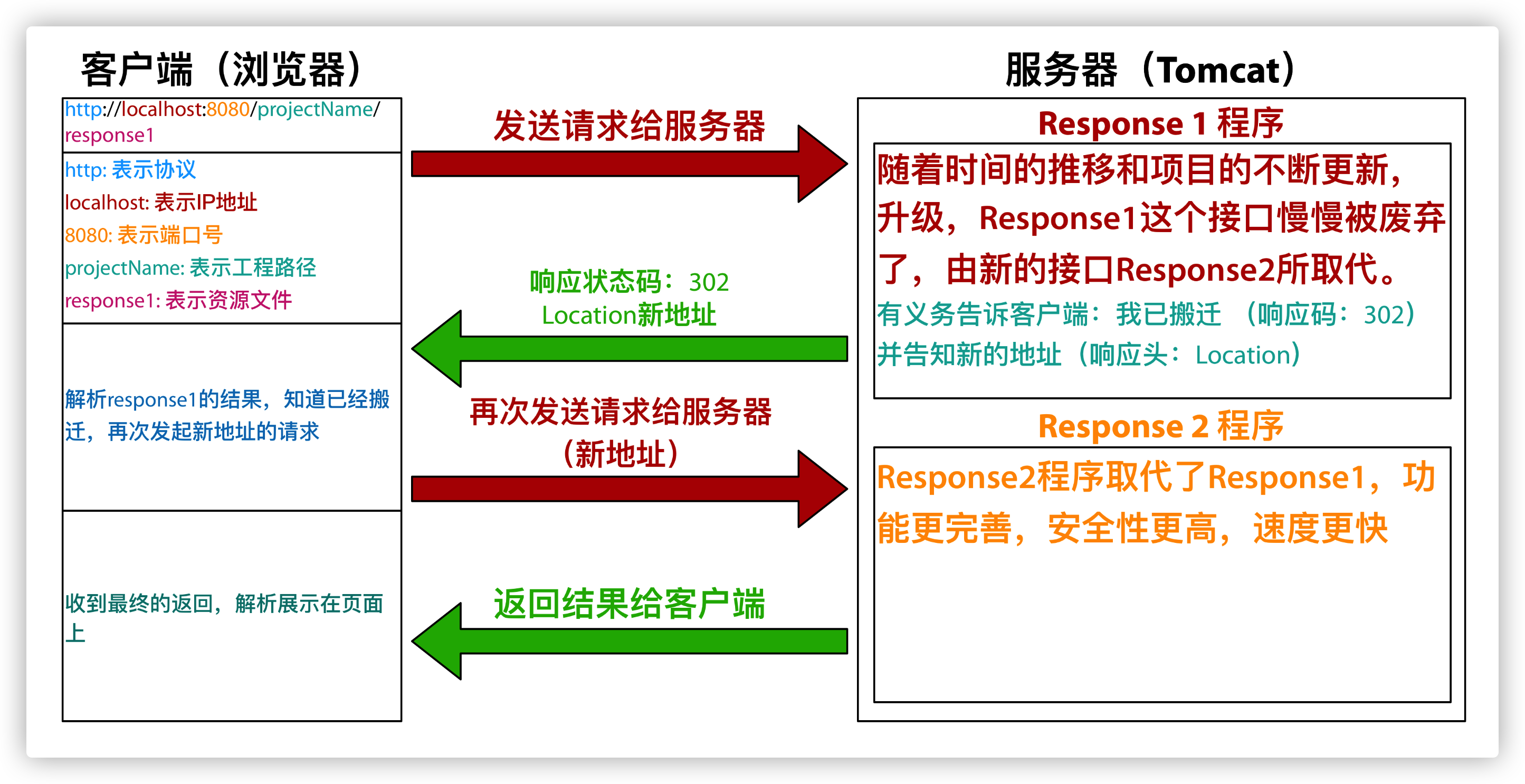
请求重定向的特点:
1. 浏览器地址栏回发生变化
2. 两次请求
3. 不共享 Request 域中的数据
4. 不能访问 WEB-INF 下的资源
5. 可以访问工程以外的资源
示例代码:
方案一
Response1.java
/**
 * @author gregperlinli
 */
public class Response1 extends HttpServlet {
    @Override
    protected void doGet(HttpServletRequest req, HttpServletResponse resp) throws ServletException, IOException {
        System.out.println("Goodbye Response1!");
        // Set response status code 302 to indicate redirection (relocated)
        resp.setStatus(302);
        // Set the response header to indicate where the new address is
        resp.setHeader("Location", "http://localhost:8080/ServletRequest/response2");
    }
}
Response2.java
/**
 * @author gregperlinli
 */
public class Response2 extends HttpServlet {
    @Override
    protected void doGet(HttpServletRequest req, HttpServletResponse resp) throws ServletException, IOException {
        System.out.println("Hello Response2!");
        resp.getWriter().println("Response2 result");
    }
}
方案二(推荐)
Response1.java
/**
 * @author gregperlinli
 */
public class Response1 extends HttpServlet {
    @Override
    protected void doGet(HttpServletRequest req, HttpServletResponse resp) throws ServletException, IOException {
        System.out.println("Goodbye Response1!");
        resp.sendRedirect("http://localhost:8080/ServletRequest/response2");
    }
}
Response2.java 与方案一的一致

