Java Web 从入门到退坑 —— 第八章 jsp
By -gregPerlinLi-
1. 什么是 jsp,它有什么用?
jsp 的全称是 Java server pages,也就是 Java 服务器页面。
jsp 的主要作用是代替 Servlet 程序回传 HTML 页面的数据。
因为 Servlet 程序回传 HTML 页面数据是一件非常繁琐的事情,开发成本和维护成本极高。
示例代码:
<%--
  Created by IntelliJ IDEA.
  User: gregperlinli
  Date: 2021/2/21
  Time: 10:20 上午
  To change this template use File | Settings | File Templates.
--%>
<%@ page contentType="text/html;charset=UTF-8" language="java" %>
<html>
<head>
    <title>Title</title>
</head>
<body>
    This is jsp page data!
</body>
</html>
jsp 的小结
1. 如何创建 jsp 页面:在 webapp 目录下点击 New > JSP/JSPX 然后填写文件名并敲击回车即可创建。
2. jsp 如何访问:jsp 页面和 HTML 页面一样,都是存放在 webapp 目录下,访问也和 HTML 一致。
2. jsp 的本质是什么
jsp 页面本质上是一个 Servlet 程序
当第一次访问 jsp 页面时,Tomcat 服务器回把 jsp 页面翻译为一个 Java 源文件,并且对它进行编译成 .class 字节码程序。在打开该 Java 文件后不难发现其实里面的内容是
/*
* Generated by the Jasper component of Apache Tomcat
* Version: Apache Tomcat/9.0.43
* Generated at: 2021-02-21 02:35:23 UTC
* Note: The last modified time of this file was set to
* the last modified time of the source file after
* generation to assist with modification tracking.
*/
package org.apache.jsp;
import javax.servlet.*;
import javax.servlet.http.*;
import javax.servlet.jsp.*;
public final class a_jsp extends org.apache.jasper.runtime.HttpJspBase
implements org.apache.jasper.runtime.JspSourceDependent,
org.apache.jasper.runtime.JspSourceImports {
private static final javax.servlet.jsp.JspFactory _jspxFactory =
javax.servlet.jsp.JspFactory.getDefaultFactory();
private static java.util.Map<java.lang.String,java.lang.Long> _jspx_dependants;
private static final java.util.Set<java.lang.String> _jspx_imports_packages;
private static final java.util.Set<java.lang.String> _jspx_imports_classes;
static {
_jspx_imports_packages = new java.util.HashSet<>();
_jspx_imports_packages.add("javax.servlet");
_jspx_imports_packages.add("javax.servlet.http");
_jspx_imports_packages.add("javax.servlet.jsp");
_jspx_imports_classes = null;
}
private volatile javax.el.ExpressionFactory _el_expressionfactory;
private volatile org.apache.tomcat.InstanceManager _jsp_instancemanager;
public java.util.Map<java.lang.String,java.lang.Long> getDependants() {
return _jspx_dependants;
}
public java.util.Set<java.lang.String> getPackageImports() {
return _jspx_imports_packages;
}
public java.util.Set<java.lang.String> getClassImports() {
return _jspx_imports_classes;
}
public javax.el.ExpressionFactory _jsp_getExpressionFactory() {
if (_el_expressionfactory == null) {
synchronized (this) {
if (_el_expressionfactory == null) {
_el_expressionfactory = _jspxFactory.getJspApplicationContext(getServletConfig().getServletContext()).getExpressionFactory();
}
}
}
return _el_expressionfactory;
}
public org.apache.tomcat.InstanceManager _jsp_getInstanceManager() {
if (_jsp_instancemanager == null) {
synchronized (this) {
if (_jsp_instancemanager == null) {
_jsp_instancemanager = org.apache.jasper.runtime.InstanceManagerFactory.getInstanceManager(getServletConfig());
}
}
}
return _jsp_instancemanager;
}
public void _jspInit() {
}
public void _jspDestroy() {
}
public void _jspService(final javax.servlet.http.HttpServletRequest request, final javax.servlet.http.HttpServletResponse response)
throws java.io.IOException, javax.servlet.ServletException {
if (!javax.servlet.DispatcherType.ERROR.equals(request.getDispatcherType())) {
final java.lang.String _jspx_method = request.getMethod();
if ("OPTIONS".equals(_jspx_method)) {
response.setHeader("Allow","GET, HEAD, POST, OPTIONS");
return;
}
if (!"GET".equals(_jspx_method) && !"POST".equals(_jspx_method) && !"HEAD".equals(_jspx_method)) {
response.setHeader("Allow","GET, HEAD, POST, OPTIONS");
response.sendError(HttpServletResponse.SC_METHOD_NOT_ALLOWED, "JSP 只允许 GET、POST 或 HEAD。Jasper 还允许 OPTIONS");
return;
}
}
final javax.servlet.jsp.PageContext pageContext;
javax.servlet.http.HttpSession session = null;
final javax.servlet.ServletContext application;
final javax.servlet.ServletConfig config;
javax.servlet.jsp.JspWriter out = null;
final java.lang.Object page = this;
javax.servlet.jsp.JspWriter _jspx_out = null;
javax.servlet.jsp.PageContext _jspx_page_context = null;
try {
response.setContentType("text/html;charset=UTF-8");
pageContext = _jspxFactory.getPageContext(this, request, response,
null, true, 8192, true);
_jspx_page_context = pageContext;
application = pageContext.getServletContext();
config = pageContext.getServletConfig();
session = pageContext.getSession();
out = pageContext.getOut();
_jspx_out = out;
out.write("\n");
out.write("\n");
out.write("<html>\n");
out.write("<head>\n");
out.write(" <title>A</title>\n");
out.write("</head>\n");
out.write("<body>\n");
out.write(" a.jsp page\n");
out.write("</body>\n");
out.write("</html>\n");
} catch (java.lang.Throwable t) {
if (!(t instanceof javax.servlet.jsp.SkipPageException)){
out = _jspx_out;
if (out != null && out.getBufferSize() != 0)
try {
if (response.isCommitted()) {
out.flush();
} else {
out.clearBuffer();
}
} catch (java.io.IOException e) {}
if (_jspx_page_context != null) _jspx_page_context.handlePageException(t);
else throw new ServletException(t);
}
} finally {
_jspxFactory.releasePageContext(_jspx_page_context);
}
}
}
在跟踪源代码后发现,HttpJspBase 类,它直接继承了 HttpServlet 类,也就是说 jsp 翻译出来的 Java 类间接的继承了 HttpServlet 类,也就是说翻译出来的就是一个 Servlet 程序
总结: 通过翻译的 Java 源代码,可以得知 jsp 就是 Servlet 程序。
通过观察可以发现翻译出来的 Servlet 源代码中的底层实现也是通过输出流把 HTML 页面回传到客户端
3. jsp 的三种语法
3.1. jsp 头部的 page 命令
jsp 的 page 指令可以修改 jsp 页面中的一些重要属性或者行为
<%@ page contentType="text/html;charset=UTF-8" language="java" %>
1. language 属性 表示 jsp 翻译后时什么语言,暂时只支持 Java
2. contentType 属性 表示 jsp 返回的数据类型是什么,也是源码中 response.setContentType() 参数值
3. pageEncoding 属性 表示当前 jsp 页面本身的字符集
4. import 属性 和 Java 源代码中的一致,用于导包,导类
以下两个属性是给 out 输出流使用
5. autoFlush 属性 设置当 out 输出缓冲区满了之后是否自动刷新缓冲区(默认值时 true)
6. buffer 属性 设置缓冲区的大小(默认是 8KB)
7. errorPage 属性 设置当 jsp 页面运行时出错自动跳转去的的错误页面路径(路径以 \ 斜杠打头)
8. isErrorPage 属性 设置当前 jsp 页面是否是错误页面(默认是 false)如果是 true 则可以获取错误信息
9. session 属性 设置访问当前 jsp 页面,是否会创建 HttpSession 对象(默认是 true)
10. extends 属性 设置 jsp 翻译出来的 Java 类默认继承谁
3.2. jsp 中常用脚本
3.2.1. 声明脚本(很少使用)
声明脚本的格式是:
<%!
    // Declare java code
%>
作用:
可以给 jsp 翻译出来的 Java 类定义属性和方法甚至是静态代码块,内部类等。
示例代码:
<%@ page import="java.util.Map" %>
<%@ page import="java.util.HashMap" %>
<%@ page contentType="text/html;charset=UTF-8"
errorPage="/error500.jsp"
language="java" %>
<html>
<head>
<title>B</title>
</head>
<body>
b.jsp page
<!-- 1. Declare class properties -->
<%!
private int id;
private String name;
private static Map<String, Object> map;
%>
<!-- 2. Declare static blocks -->
<%!
static {
map = new HashMap<String, Object>();
map.put("key1", "value1");
map.put("key2", "value2");
map.put("key3", "value3");
map.put("key4", "value4");
map.put("key5", "value5");
}
%>
<!-- 3. Declare class methods -->
<%!
public int abc() {
return 12;
}
%>
<!-- 4. Declare inner classes -->
<%!
public static class A {
private int id = 12;
private String abc = "abc";
}
%>
</body>
</html>
翻译出来的 Java 代码:
......
public final class b_jsp extends org.apache.jasper.runtime.HttpJspBase implements org.apache.jasper.runtime.JspSourceDependent, org.apache.jasper.runtime.JspSourceImports {
private int id;
private String name;
private static Map<String, Object> map;
static {
map = new HashMap<String, Object>();
map.put("key1", "value1");
map.put("key2", "value2");
map.put("key3", "value3");
map.put("key4", "value4");
map.put("key5", "value5");
}
public int abc() {
return 12;
}
public static class A {
private int id = 12;
private String abc = "abc";
}
......
}
3.2.2. 表达式脚本(常用)
表达式脚本的格式是:
<%= // Expression %>
作用:
在 jsp 页面上输出数据。
特点:
1. 所有的表达式脚本都会被翻译到 _jspService() 方法中
2. 表达式脚本都会被翻译成为 out.print() 输出到页面上
3. 由于表达式脚本翻译的内容都在 _jspService() 方法中,所以 _JspService() 方法中的所以对象都可以直接使用
4. 表达式脚本中的表达式不能以分号结束
示例代码:
<%@ page import="java.util.Map" %>
<%@ page import="java.util.HashMap" %>
<%@ page contentType="text/html;charset=UTF-8"
         errorPage="/error500.jsp"
         language="java" %>
<html>
<head>
    <title>B</title>
</head>
<body>
    b.jsp page<br/>
    <!-- 1. Output integer -->
    <!=12%><br/>
    <!-- 2. Output floate -->
    <!=12.34%><br/>
    <!-- 3. Output stirng -->
    <!="I'm String"%><br/>
    <!-- 4. Output object -->
    <!=map%><br/>
</body>
</html>
3.2.3. 代码脚本
格式:
<%
        // Java code
%>
作用:
1. 可以在 jsp 页面中,编写自己需要的功能(写的是 Java 语句)
特点:
1. 代码脚本翻译之后都在 _jspService 方法中
2. 代码脚本由于翻译到 _jspService 方法中,所以在 _jspService 方法中的现有对象都可以直接使用
3. 还可以由多个代码脚本块组合完成一个完整的 Java 语句
4. 代码脚本还可以和表达式脚本一起组合使用,在 jsp 页面上输出数据
示例代码:
<%@ page import="java.util.Map" %>
<%@ page import="java.util.HashMap" %>
<%@ page contentType="text/html;charset=UTF-8"
errorPage="/error500.jsp"
language="java" %>
<html>
<head>
<title>B</title>
</head>
<body>
b.jsp page<br/>
<!-- 1. Code script -- if statement -->
<%
int i = 12;
if ( i == 12 ) {
System.out.println("The i is 12!");
} else {
System.out.println("The i is not 12!");
}
%>
<!-- 2. Code script -- for loop statement -->
<%
for ( int j = 0; j < 10; j++ ) {
System.out.println(j);
}
%>
<!-- 3. In the translated java file, the code in the _jspService method can be written -->
<%
String username = request.getParameter("username");
System.out.println("The request parameter for the username is: " + username);
%>
</body>
</html>
3.3. jsp 中的三种注释
1. HTML 注释
<!-- This is HTML notes -->
HTML 注释会被翻译到 Java 源代码中,在 _jspService 方法里以 out.writer() 输出到客户端。
2. Java 注释
// This is single line Java notes
/* This is multiline Java notes */
Java 注释通常会写在声明或代码块注释中,会被翻译到 Java 源代码中。
3. jsp 注释
<%-- This is jsp notes --%>
jsp 注释可以注释掉 jsp 页面中所有的代码。
4. jsp 九大内置对象
jsp 中的内置对象是指 Tomcat 翻译 jsp 页面成为 Servlet 源代码后,内部提供的九大对象。
request 请求对象
response 响应对象
pageContext jsp 上下文对象
session 会话对象
application ServletContext 对象
config ServletConfig 对象
out jsp 输出流对象
page 指向当前 jsp 的对象
expection 异常对象
5. jsp 四大域对象
四个域对象分别是:
| 对象 | 所属类 | 有效范围 |
|---|---|---|
pageContex |
PageContextImpl 类 |
当前 jsp 页面范围内有效 |
request |
HttpServletRequest 类 |
一次请求内有效 |
session |
HttpSession 类 |
一个会话范围内有效(打开浏览器访问服务器直到关闭浏览器) |
application |
servletContext 类 |
整个 Web 工程范围内都有效(只要 Web 工程不停止,数据都在) |
域对象是可以像 Map 一样存储数据的对象,四个域对象功能一样,不同的是它们对数据的存储范围。
虽然四个域对象都可以储存数据,但是在使用上它们是有优先顺序的。
四个域在使用的时候优先顺序分别是它们从小到的的范围的顺序。
pageContext >> request >> session >> application
示例代码:
scope.jsp
<body>
    <h1>scope.jsp pages</h1>
    <%
        // Data is saved in each of the four fields
        pageContext.setAttribute("key", "pageContext");
        request.setAttribute("key", "request");
        session.setAttribute("key", "session");
        application.setAttribute("key", "application");
    %>
    Is there a value in pageContext: <%=pageContext.getAttribute("key")%> <br/>
    Is there a value in request: <%=request.getAttribute("key")%> <br/>
    Is there a value in session: <%=session.getAttribute("key")%> <br/>
    Is there a value in application: <%=application.getAttribute("key")%> <br/>

    <%
        request.getRequestDispatcher("/scope2.jsp").forward(request, response);
    %>
</body>
scope2.jsp
<body>
    <h1>scope2.jsp pages</h1>
    Is there a value in pageContext: <%=pageContext.getAttribute("key")%> <br/>
    Is there a value in request: <%=request.getAttribute("key")%> <br/>
    Is there a value in session: <%=session.getAttribute("key")%> <br/>
    Is there a value in application: <%=application.getAttribute("key")%> <br/>
</body>
6. jsp 中 out 输出和 response.getWriter 输出的区别
response 表示响应,我们经常用于设置返回给客户端的内容(输出)
out 也是给用户做输出使用的
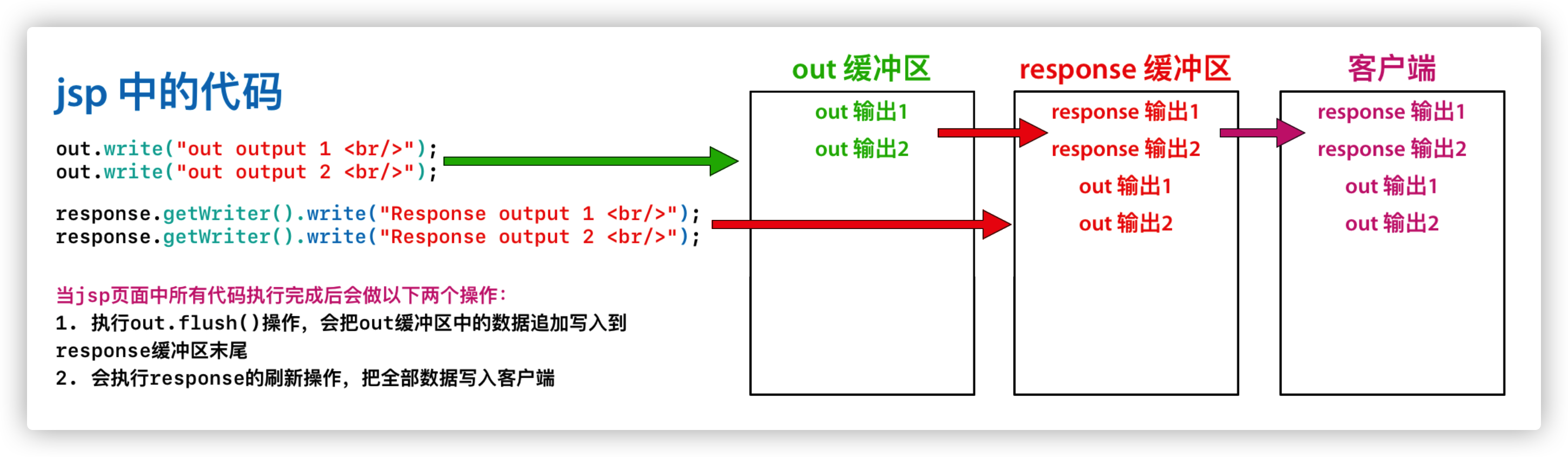
由于 jsp 翻译之后底层源代码都是使用 out 来进行输出,所以一般情况下在 jsp 页面中统一使用 out 来进行输出,避免打乱页面输出内容的顺序
out.write() 只适合输出字符串
out.print() 输出任意数据都没有问题(都转化为字符串后调用的 write 输出)
深入源码,浅出结论:在 jsp 页面中,可以统一使用 out.print 来进行输出
7. jsp 的常用标签
7.1. jsp 静态包含
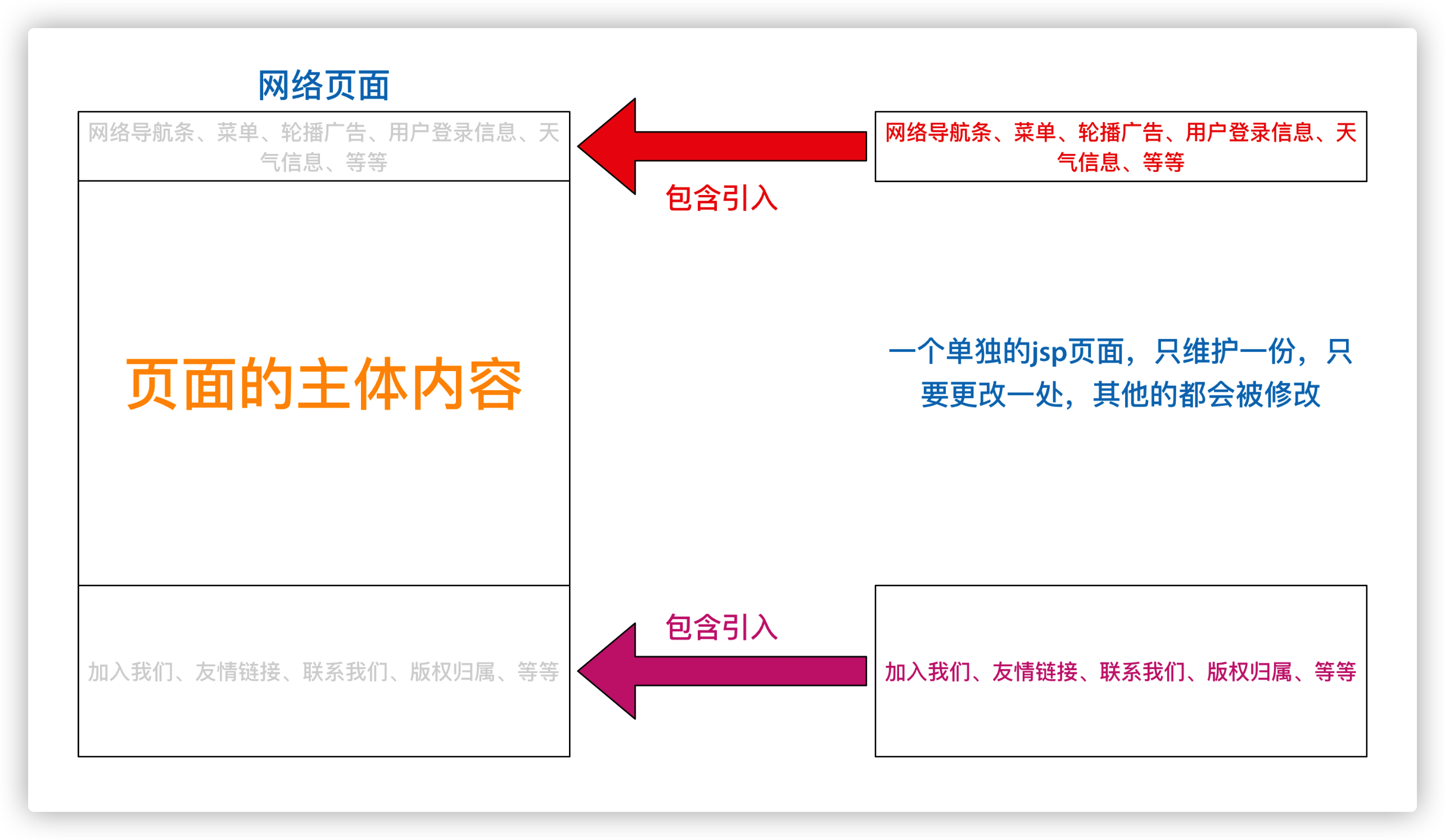
示例说明:
<!--
        This is static include,
        the jsp path to be included in the top of the file attribute
        the first slash in the address indicates http://ip:port/projectName/,
        webapp directory mapped to code
-->
<%@include file="/include/foot.jsp"%>
特点:
1. 静态包含不会翻译被包含的 jsp 页面。
2. 静态包含其实是把被包含的 jsp 页面的代码拷贝到包含的位置执行输出。
7.2. jsp 动态包含
示例说明:
<!--
    This is dynamic include,
    the page attribute is the path to the JSP page you want to include,
    the first slash in the address indicates http://ip:port/projectName/,
    webapp directory mapped to code
-->
<jsp:include page="/include/head.jsp"></jsp:include>
动态包含也可以像静态包含一样,把被包含的内容执行输出到包含位置。
特点:
1. 动态包含会把包含的 jsp 页面也翻译成为 Java 代码
2. 动态包含底层代码使用如下代码去调用 jsp 页面执行输出:
JspRuntimeLibrary.include(request, response, "/include/head.jsp", out, false);
动态包含的底层原理:
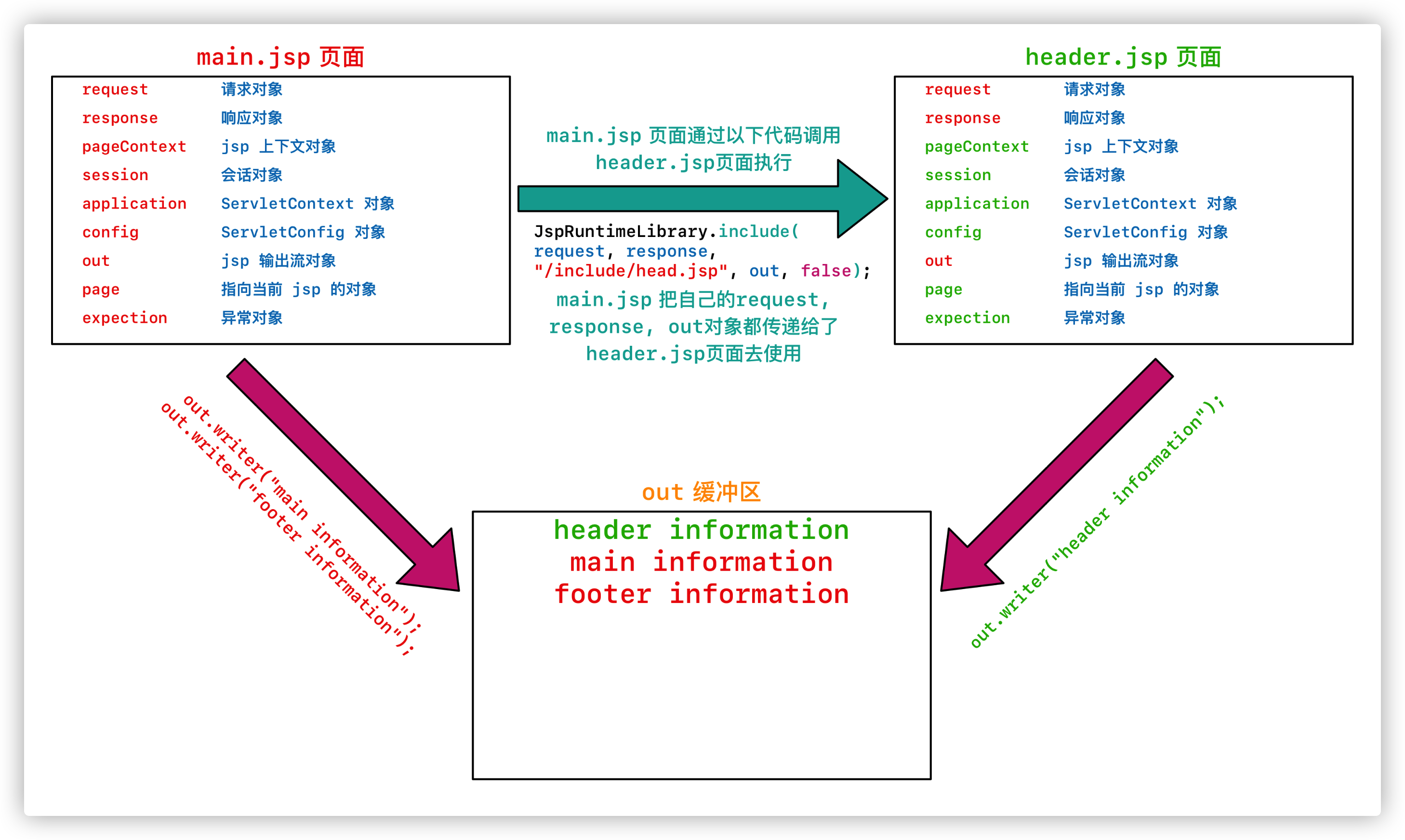
3. 动态包含还可以传递参数
7.3. jsp 标签-转发
示例说明:
8. Listener 监听器
1. Listener 监听器是 JavaWeb 的三大组件之一,JavaWeb 三大组件分别是:Servlet 程序、Filter 过滤器、Listener 监听器。
2. Listener 它是 JavaEE 的规范,就是接口。
3. 监听器的作用是监听某种事物的变化并回调函数反馈给用户(程序)去做一些相应的处理。
8.1. ServletContextListener 监听器
ServletContextListener 它可以监听 ServletContext 对象创建和销毁。
ServletContext 对象在 Web 工程启动的时候创建,在 Web 工程停止的时候销毁。
监听到创建和销毁后都会分别调用 ServletContextListener 监听器的方法反馈。
两个方法分别是:
public interface ServletContextListener extends EventListener {
/**
* Receives notification that the web application initialization
* process is starting.
*
* <p>All ServletContextListeners are notified of context
* initialization before any filters or servlets in the web
* application are initialized.
*
* @param sce the ServletContextEvent containing the ServletContext
* that is being initialized
*
* @implSpec
* The default implementation takes no action.
*/
default public void contextInitialized(ServletContextEvent sce) {}
/**
* Receives notification that the ServletContext is about to be
* shut down.
*
* <p>All servlets and filters will have been destroyed before any
* ServletContextListeners are notified of context
* destruction.
*
* @param sce the ServletContextEvent containing the ServletContext
* that is being destroyed
*
* @implSpec
* The default implementation takes no action.
*/
default public void contextDestroyed(ServletContextEvent sce) {}
}
contextInitialized() 在 ServletContext 对象创建之后马上调用,做初始化。
contextDestroyed() 在 ServletContext 对象销毁之后马上调用,
如何使用 ServletContextListener 监听器监听 ServletContext 对象
使用步骤如下:
1. 编写一个类去实现 ServletContextListener
2. 实现其两个回调方法
3. 到 web.xml 中去配置监听器
在 web.xml 中配置监听器:
<!-- Configure listeners -->
<listener>
    <listener-class>com.example.listener.MyServletContextListenerImpl</listener-class>
</listener>

